
Your needs, this model
Does it fit your priorities?
Can I keep two compatible dry foods separate and choose a blend?
P591 has a two-liter and a three-liter reservoir feeding one bowl. Each hopper has its own portion setting; separate storage is not separate access for two cats.
Explore this need in the finder →Will this original YumShare work on a 5 GHz-only network?
No. Its original manual explicitly supports 2.4 GHz and excludes 5 GHz. The newer P592 is a different model with documented dual-band support.
Explore this need in the finder →Can I watch live meals without assuming free permanent video history?
Live viewing is documented, while previous recorded clips and retention are governed by PETKIT Care+ terms after the initial trial. Check the current plan if reviewing past meals matters.
Explore this need in the finder →Two dry-food stores and one camera-watched feeding station
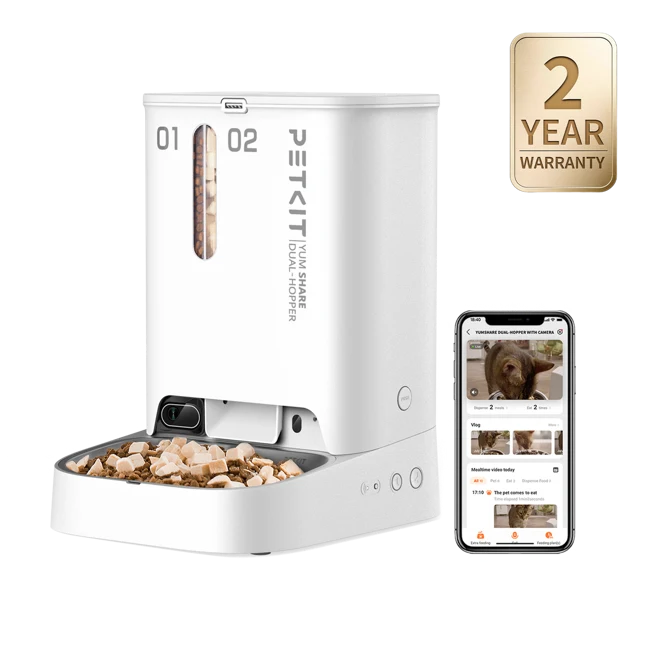
The PETKIT YumShare Dual-Hopper P591 is useful when you want to store two compatible dry foods separately, choose how they are dispensed and view the feeding area remotely. It is the original dual-hopper camera model, identified as P591 in the manufacturer's manual. It should not be treated as interchangeable with the newer P592 merely because the body and YumShare name look familiar.
The feeding arrangement is the first thing to understand. Two hoppers supply one stainless-steel bowl. You can dispense from either reservoir or use a selected combination, but you are not buying two simultaneous bowl positions or a mechanism that keeps each cat's diet available only to that cat.
The two reservoirs have unequal capacity
The exact manual divides the total five liters into a two-liter first hopper and a three-liter second hopper. That matters when you decide what goes where. A food used frequently may make more sense in the larger side, while a less-used compatible food can occupy the smaller one. The capacity split does not automatically align with your desired dispensing ratio.
Think about which reservoir will empty first under the actual plan. A five-liter total can sound generous while the smaller side still requires earlier attention. The app's supported alerts can help, but check both stores rather than assuming that food visible on one side means every scheduled blend is ready to dispense.
Each hopper offers one to ten portion units per meal. A portion setting is not a count of scheduled daily meals, and it is not a precision weight measurement for every food. Observe each food's output separately before relying on a combined release. The device is a way to implement your chosen routine, not to determine which foods should be combined.
Food compatibility is separate from having two choices
The manual and current product reference specify regular dry kibble no larger than 12 mm, with a separate 9 mm maximum for freeze-dried pieces. A large freeze-dried chunk does not qualify merely because it fits the regular-kibble limit. Keep the shape and texture of the intended food in mind and check actual dispensing before depending on the timetable.
The safety instructions restrict the hopper to dry pet food. This is not a wet-food tray or a cooling appliance. A divider, enclosed outlet and desiccant concern dry-food storage; they do not turn either reservoir into a place for a canned or refrigerated meal.
A camera offers visibility, not exclusive access
The integrated camera provides live viewing, with supported night-view and two-way audio functions. It can be useful if your question is whether the feeding area looks normal or whether a cat has approached. It is less useful if your actual requirement is to stop another animal from eating the dispensed food. Observation and access control are different jobs.
Place the feeder so the feeding area can be viewed without unnecessarily pointing it across a busy private room. The manual provides camera and microphone controls, recording-time settings and an option that blurs the initial live frame. Those are practical settings to review with everyone in the household, rather than assuming the default camera behavior fits every location.
Live view and video history are different services
The current page distinguishes initial trial access from continuing playback through PETKIT Care+. The manual likewise separates real-time viewing from full recorded clips and time-limited cloud storage. If watching yesterday's meal is central to the reason for buying, check the actual service plan and retention terms before relying on history.
A camera image also does not establish the exact mass a pet consumed. Use it as a visual check alongside the feeding routine, not as a measured nutrition or intake report. No independent accuracy, recognition or long-term reliability test is claimed in this assessment.
Setup, stored schedules and outage power
P591 connects through 2.4 GHz Wi-Fi; the original manual expressly excludes 5 GHz. The app establishes the timetable, while the two hopper buttons provide manual dispensing rather than complete local schedule programming. Someone needing app-free setup should compare a locally programmed feeder.
The documented normal supply is the original 6V adapter. Four separately purchased D alkaline cells provide emergency feeding power, and PETKIT says previously stored schedules continue offline and during an outage. That narrower promise should not be expanded into guaranteed backup camera operation, app communication or cloud recording. Verify the saved plan and battery condition before relying on it.
Cleaning and deciding between generations
The manual shows removal of the partition, vanes and impeller components for cleaning, followed by complete drying before reassembly. Keep the powered base out of water and do not remove the partition with food still inside. The ability to reach two food paths is useful, but it also means checking that both have been reassembled properly.
Choose P591 for two compatible dry-food stores, one open bowl, camera viewing and a suitable 2.4 GHz setup. Compare P592 if verified 5 GHz support is essential, a dual-bowl model for two feeding positions, or a selective-access system if the main need is keeping one pet away from another's food.
Sources: PETKIT P591 product reference and FAQ and P591 original manufacturer manual, August 2023 edition.
Key details at a glance
| Dry-food compatibility | Yes |
|---|---|
| Wet-food compatibility | No |
| Timed meal releases | Yes |
| App plans or food targets | Yes |
| Integrated camera | Yes |
| Local meal-schedule programming | No |
| Routine battery operation | No |
| Backup for stored meal schedules | Yes |
| Separate simultaneous feeding positions | No |
| Separate food hoppers | Yes |
| Dry-food hopper volume | 5 L |
| Documented upper regular-kibble boundary | 12 mm |
Use the exact model’s instructions for operating limits, supplied equipment and version differences.
Sources for this assessment
Compare the options for your routine.
Bring together the food, feeding function, controls and power that matter to you.