
Your needs, this model
Does it fit your priorities?
Can I schedule wet meals with active cooling rather than ice packs?
FreshFeed uses powered semiconductor cooling and app schedules for a pre-portioned tray. It needs the specified indoor environment and mains setup; safe storage duration still follows the intended food’s guidance.
Explore this need in the finder →Does the ten-program timetable hold ten meals before refilling?
No. There are six tray compartments: the first is immediately accessible and five open later. Ten software program slots do not increase the tray’s food capacity; plan when to refill and reset.
Explore this need in the finder →Can I get a reminder to refill after a complete tray rotation?
Yes. Enable Stop After Full Rotation; it is off by default. The feeder then counts meals, stops after the sixth and asks you to refill and reset. Match the insert setting to whether steel inserts are installed.
Explore this need in the finder →Pre-portioned wet meals with powered cooling
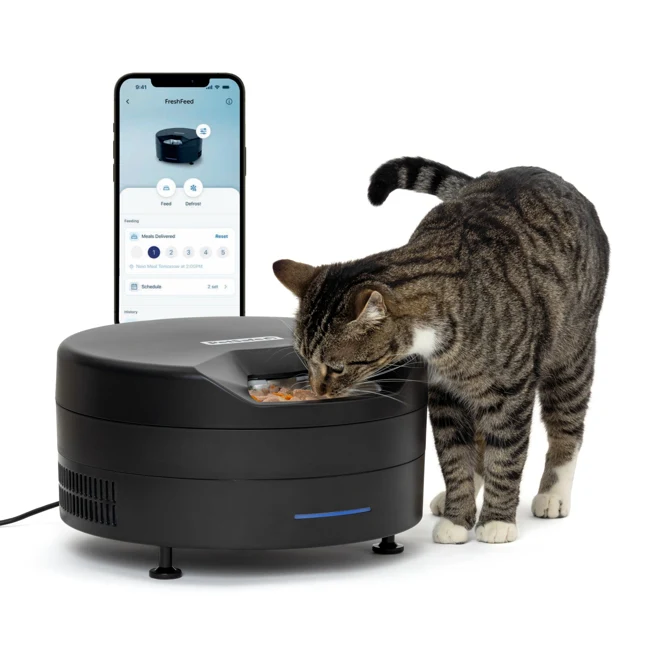
The PetSafe FreshFeed PFD00-18290 is designed around food you divide into a rotating tray before serving. It combines active cooling with an app-controlled timetable. That makes it worth considering when the main problem is offering later wet meals while you are away for part of the day, provided the intended food and storage conditions suit the manufacturer's instructions.
The practical choice depends on more than refrigeration. You need an appropriate indoor location, a nearby power outlet, a suitable Wi-Fi setup and a realistic refill routine. Plan those together before deciding that the number of tray compartments matches the number of meals you need.
Six compartments do not mean six delayed openings
The first compartment is available to the cat immediately after loading. Five further compartments then become accessible as the tray rotates according to the schedule. If your goal is to prevent breakfast from being available until much later, that first open serving position matters. Plan what the cat can reach when the feeder is first put down.
PetSafe specifies up to three-quarters of a cup per compartment. Its FAQ and setup material differ on the accompanying fluid-ounce equivalent, so use the marked tray capacity and the cup guidance rather than assuming a precise converted liquid volume. Measure the intended meal before filling all the positions.
The app has ten schedule program slots. Those are times the software can retain, not ten portions hidden inside the six-compartment tray. Refilling remains necessary. A household wanting several meals every day should calculate when the tray needs attention instead of translating a maximum storage-period claim into days of unattended feeding.
Use the refill-stop option deliberately
Stop After Full Rotation is off by default. Turning it on lets the feeder count through the meals, stop rotating after the sixth and prompt you to refill and reset. That is a useful option if you want a clear end to each loaded tray rather than continuous rotation regardless of how much food remains.
Reset the count after the tray has actually been refilled. A software reset cannot establish that fresh food has been put into the compartments. If more than one person handles feeding, agree who checks the tray and who acknowledges the reset so that a reassuring display does not replace a physical food check.
Cooling needs the right location and settings
PetSafe describes semiconductor cooling to 40°F when used as directed. The operating environment is important: the support instructions specify an indoor room between 60 and 85°F, unobstructed vents and airflow beneath the unit. Keep at least an inch of clearance underneath as directed, and avoid damp placement or a surface that blocks airflow.
The manufacturer also describes a short pause in cooling before a scheduled serving. The app will not accept a new feeding less than six minutes ahead because it needs time for the pre-rotation defrost process. This is worth knowing if you expect a last-minute timetable edit to produce an immediate meal.
Follow the food maker's storage and serving directions. The feeder's own guide expressly says safe storage duration depends on the food; active cooling does not establish one universal safe holding time for every recipe. Consider the intended meals and cleaning routine rather than buying solely around a headline number of days.
The inserts change a setting as well as cleanup
The current guide lists six stainless-steel inserts in the supplied equipment. They can be used inside the tray, or food can go directly into the tray. The app's Stainless Steel Inserts setting must match that choice because it adjusts cooling-plate operation. Change the setting whenever you start or stop using the inserts.
The inserts can be washed by hand or in a dishwasher under the guide's instructions, but the food tray itself is hand-wash only. Wipe the lid and powered base without immersing them. Clearing food residue and condensation is part of preparing the next load, not just a cosmetic job.
There are also two fur filters beneath the feeder. PetSafe calls for cleaning them at least monthly because blocked filters affect temperature control. When deciding where the feeder will live, allow enough access to maintain those filters and clean around the base.
What the connected functions add
Initial setup uses the PetSafe Pet Companion app, an account and a 2.4 GHz Wi-Fi connection. You can select scheduled days and optional meal beeps, and share the device with another household member. The guide also offers an offline-notification setting, which is off by default. Turn it on if that is part of how you intend to monitor the feeder.
The documented setup uses a wall adapter. These sources do not establish battery-powered cooling or a backup cooling duration, so choose a location and care arrangement that do not depend on an unverified outage promise. The app is useful for operating the plan; it cannot supply electrical power to the cooling system.
FreshFeed fits an owner prepared to pre-portion wet meals, maintain the cooling environment and refill a finite tray. It is less suitable when the essential requirement is app-free setup, a feeding position without mains power or separate protected access for two cats.
Sources: PetSafe FreshFeed product reference and FAQ, manufacturer user guide, and official instructions for setup, schedules, settings and cooling conditions.
Key details at a glance
| Wet-food compatibility | Yes |
|---|---|
| Timed meal releases | Yes |
| Powered cooling | Yes |
| App plans or food targets | Yes |
| Local meal-schedule programming | No |
| Separate simultaneous feeding positions | No |
| Separate food hoppers | No |
| Future meal openings per filled load | 5 |
Use the exact model’s instructions for operating limits, supplied equipment and version differences.
Sources for this assessment
- PetSafe FreshFeed PFD00-18290 exact current product reference
- PetSafe FreshFeed current product FAQ
- PetSafe FreshFeed original manufacturer 15-page user guide
- PetSafe FreshFeed official setup and connection instructions
- PetSafe FreshFeed official schedule instructions
- PetSafe FreshFeed official settings instructions
- PetSafe FreshFeed temperature troubleshooting
- PetSafe FreshFeed exact no-power support
- PetSafe FreshFeed exact support hub and manufacturer image
Compare the options for your routine.
Bring together the food, feeding function, controls and power that matter to you.