
On this page
Your needs, this model
Does it fit your priorities?
Can I use it on a 5 GHz-only network?
No. The CA10 manual supports 2.4 GHz only; the Cube and Heritage family names do not imply identical wireless hardware.
Explore this need in the finder →Is 10 mm dry food with app planning a documented fit?
The exact CA10 range is2–12 mm dry food with app-based meal plans. Check the actual shape and trial portions before relying on the routine.
Explore this need in the finder →Does the local feed button replace the app for scheduling?
No. It releases food immediately; the documented plan setup uses WOpetLife. Require local initial programming to compare genuine no-app timers.
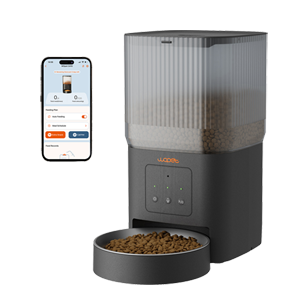
Explore this need in the finder →WOpet Cube Air CA10 suits a dry-food routine with app-managed meal times and a moderate 4 L reservoir. It is a useful alternative to a camera feeder when remote schedule changes matter more than video. Check its 2.4 GHz network requirement and the reduced functions on backup power.
A connected schedule in a smaller reservoir
The CA10 product specification and exact Cube Air manual identify the model and its 4 L capacity. The manual documents up to ten daily meal appointments. Think about the refill interval you want and whether the serving area fits the intended feeding corner.
Schedule changes use WOpet Life. The local control provides an immediate release, recording and setup functions; it is not a complete locally entered timetable. Choose a local timer model if avoiding app-based programming is the essential requirement.
Pairing needs the right network and power mode
The manual requires 2.4 GHz Wi-Fi and says pairing works on the normal external supply. The CA10 support page also describes the compatible network and credentials. Check the real network at the feeding location before depending on remote changes.
If longer or different network credentials are required in your home, confirm compatibility before purchase. Choose another feeder rather than weaken an existing network merely to complete pairing. A successful connection in one room does not establish reliable communication in every position.
Regular kibble between 2 and 12 mm
The exact manual specifies dry food in the 2–12 mm range. Wet meals belong in a different feeding system. Check irregular pieces and observe the food coming through the outlet; a diameter specification is not a universal guarantee that every recipe will dispense equally.
The first releases after filling may differ while food enters the mechanism, as the manufacturer explains. Establish the amount using several trial portions, then review the total for the daily plan. A menu setting is not a dietary prescription or proof that the bowl's contents were eaten.
Backup is a reduced operating mode
The manual identifies three D alkaline cells and explicitly describes them as backup rather than the primary supply. App operations are unavailable on cells. This means that the feature list in normal plugged-in use should not be transferred unchanged to battery operation.
If scheduled feeding through an outage is essential, check the saved plan on the exact unit before relying on it. The documentation does not clearly establish every stored-plan detail for this model, so CA10 is not included in our essential scheduled-backup matches on a general dual-power claim alone. Compare original F07 for explicitly documented stored-plan behavior.
Cleaning and the exposed bowl
The reservoir, outlet and bowl need attention even when an app log looks normal. Empty remaining food before dismantling the path, clean as instructed and dry the parts before rebuilding. Check the next release rather than assuming a previously working setting proves the rebuilt mechanism is ready.
CA10 provides one shared feeding position. It does not document a pet-selective lid, so an alert or meal call does not stop another animal eating. Use protected-food choices if separating cats' meals is the difficult part of the routine.
A focused reason to choose Cube Air
Choose it for compatible dry food, app scheduling, one open bowl and a suitable 2.4 GHz setup. Choose a camera feeder for remote observation, a local timer for no-app programming or a protected bowl for food stealing. Those distinct needs are more useful than treating every smart-feeder label as the same capability.
Key specifications
Key details at a glance
| Dry-food compatibility | Yes |
|---|---|
| Wet-food compatibility | No |
| Timed meal releases | Yes |
| Pet-specific access control | No |
| Powered cooling | No |
| Ice-pack arrangement | No |
More specifications and setup details
| App plans or food targets | Yes |
|---|---|
| Local meal-schedule programming | No |
| Routine battery operation | No |
| Separate simultaneous feeding positions | No |
| Separate food hoppers | No |
| Maximum documented scheduled meals per day | 10 |
| Dry-food hopper volume | 4 L |
| Documented minimum regular-kibble diameter | 2 mm |
| Documented upper regular-kibble boundary | 12 mm |
Use the exact model’s instructions for operating limits, supplied equipment and version differences.
Sources for this review
Sources for this assessment
Compare the options for your routine.
Bring together the food, feeding function, controls and power that matter to you.